
Cocobi Camping Play - kids
KIGLEEducational
3.53.00 Reviews
- Version
- 1.0.3
- Installs
- 100.00K
- Age Rating
- Everyone
Screenshots
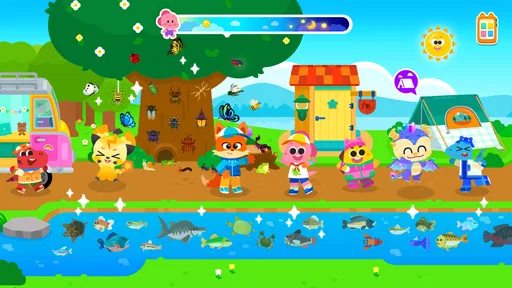
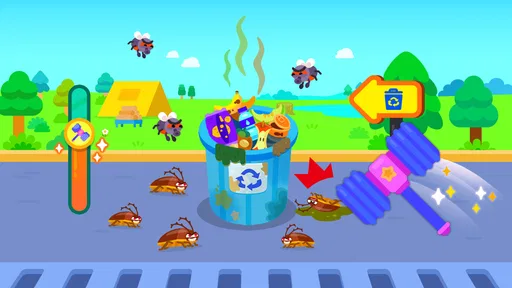
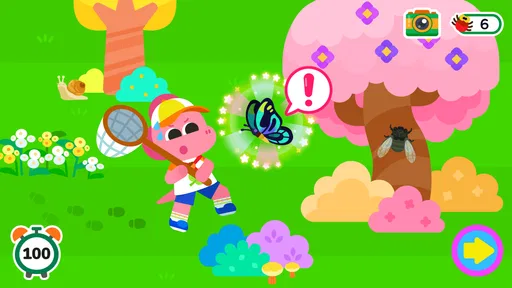
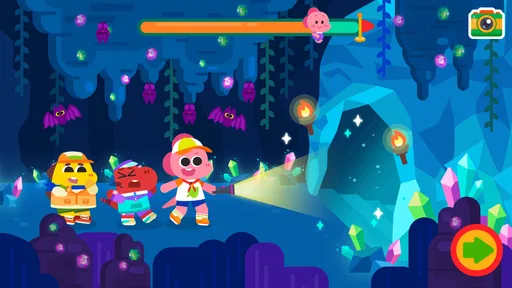

Our Review of Cocobi Camping Play - kids
 Analysis by Appyee
I found Cocobi Camping Play - kids easy to understand from the first tap: it presents a cheerful camping theme, simple interactions, and a gentle pace aimed at young children. It is an educational game from KIGLE, available for free, with an Everyone age rating. My first impression was positive because a child can begin exploring without needing to read complicated instructions or understand a dense menu.
The important question, though, is not whether the camping setting is pleasant for an afternoon. Many children’s games are charming during the first session and then become background noise. After spending time with this one, I see it as a short, low-pressure activity that works best when an adult uses it intentionally rather than treating it as an endlessly replayable game. Its strongest quality is accessibility; its main weakness is that the novelty of the theme can fade faster than the novelty of a deeper learning app.
What the first week feels like
During the first few sessions, the camping idea gives the game a useful sense of purpose. Instead of presenting isolated educational exercises, it places the child in a familiar outdoor setting. That framing matters for younger players because “camping” is easier to imagine than a page of abstract tasks. I noticed that the setting can encourage conversation: a parent can ask what the characters are doing, what belongs at a campsite, or what the child would pack for a trip.
The controls feel suited to children who are still developing confidence with touchscreens. The experience does not demand the speed or precision associated with action games, which makes it less frustrating for a child who is learning how taps, presses, and swipes affect the screen. I would introduce it on a larger phone or tablet, especially if the child tends to tap with a whole hand rather than one fingertip.
The first-week appeal is also helped by the absence of an entry cost. The game is free to start, so parents can observe whether the child actually enjoys the camping activities before deciding whether it deserves regular use. There are in-app purchases priced at $1.49 per item, so I would still check the purchase settings before handing over a device. The price is modest, but young children are very good at tapping attractive buttons without understanding that a transaction may follow.
For a realistic everyday use, I can see this working well after daycare or before a short car journey. A parent could sit beside a child for ten minutes, let the child lead the activity, and then turn the screen into a conversation starter about outdoor safety, clothing, food, or looking after shared spaces. That shared approach gives the game more value than simply leaving it running while an adult handles other tasks.
The game’s educational category should be understood in a practical way. It is not a replacement for a structured early-learning course, reading program, or classroom activity. Its learning value comes from guided play, repetition, recognition, and discussion. If your child expects formal lessons with visible progress, this may feel too light. If your goal is to offer a friendly activity that supports language and everyday thinking, the camping context is a reasonable fit.
Why the setting helps younger players
Camping is a flexible theme because it naturally connects several kinds of learning. A child can talk about objects, actions, sequence, and care for the environment without the app needing to announce a lesson every few seconds. I found that this makes the experience feel less like a test. Children who resist obvious educational software may be more willing to explore when the activity is presented as play.
There is also a useful distinction between independent use and supported use. A child who already understands touchscreen conventions may move through the game comfortably alone for a short period. A younger child or a child with limited device experience may need an adult nearby at the beginning. That is not a flaw unique to this title; it is simply the reality of many games designed for early learners. The best results come when the adult demonstrates one interaction, then lets the child try rather than taking control.
One practical tip is to avoid presenting it as a reward for finishing every other task. That can make the game feel like a disposable treat instead of a space for exploration. I prefer setting a small routine: choose a calm moment, play briefly, and stop while the child is still comfortable. This approach makes it easier to judge whether the child returns because the activities remain interesting or only because the screen is available.
Where the early excitement starts to weaken
The first-week experience is not equally strong for every child. Children who love outdoor stories, cute characters, and pretend play will probably connect with it quickly. Children who want competitive goals, fast movement, or a clear challenge may lose interest sooner. The calm design is an advantage for parents seeking a gentle game, but it also means there is less pressure to keep improving.
I would also be careful about expecting the app to occupy a child for a long uninterrupted stretch. Its design is better suited to short visits than to a full afternoon. When a child repeats the same actions without talking about them or making a new connection, the educational benefit can flatten. At that point, changing the activity is more useful than encouraging more screen time.
Does it earn a place after the novelty fades?
The answer depends on how you define recurring value. If you want a game that constantly introduces new systems, increasingly difficult stages, or a large sense of progression, this is probably not the right choice. If you want a familiar, low-pressure activity that a child can revisit with different conversations, it has a better chance of remaining useful.
In my experience, the camping theme provides more replay value when adults vary the questions around it. On one visit, I might focus on naming objects. On another, I might ask the child to explain what should happen first or why a character needs a particular item. A third visit could become a pretend-planning exercise for an imaginary trip. The game itself does not need to change dramatically for the surrounding learning to change.
That is one of the less obvious strengths here: the app can act as a prompt for offline play. After a session, a child could draw a campsite, sort household objects into “camping” and “not camping,” or help prepare a small pretend backpack. Those activities prevent the screen from becoming the entire experience. They also help parents test whether the game is supporting genuine understanding or merely producing repeated taps.
There is a trade-off, however. This kind of replay value depends heavily on the adult’s participation and the child’s imagination. A child using the game alone may experience a narrower loop. Parents who want built-in variety, detailed progress tracking, or a clear curriculum may prefer a more structured educational alternative. I would not buy this expecting a complete learning plan.
How it compares with familiar alternatives
Compared with general puzzle games for children, the camping focus gives this title a warmer narrative frame. It feels less like a collection of disconnected screens and more like a small themed visit. Compared with formal learning apps, it is lighter and easier to approach, but it also offers less obvious academic structure. Compared with open-ended drawing or pretend-play apps, it gives the child more direction, although that direction can limit creativity once the activities become familiar.
For a child who needs practice with basic device interaction, this may be a better starting point than a busy game filled with menus and rewards. For a child already comfortable with educational apps, it may feel too simple unless the family adds conversation and offline extensions. I would choose it for calm, guided play rather than measurable skill training.
The developer, KIGLE, places this release in a recognizable children’s entertainment space, and the store information shows an average rating of 3.5 from around 315 ratings. I would read that as a sign to keep expectations balanced rather than as a reason to dismiss the game. The title has passed roughly 100,000 installs, which suggests that the concept has found an audience, but popularity alone does not guarantee that it will suit your child’s temperament.
The maintenance burden for parents
Maintenance is fairly manageable if you treat the game as a small part of a routine. The current version is 1.0.3, and it requires Android 7.0 or later. Before installing, I would check the device’s operating system and available space, then open the game myself once. That first adult check is useful for understanding the navigation, spotting purchase prompts, and deciding whether the screen is comfortable for the child.
The bigger maintenance issue is not technical; it is supervision. Because the audience is young, parents should establish clear boundaries around when the game is used and whether purchases are allowed. Even a free game can create friction if a child expects unlimited access or accidentally reaches a paid item. I recommend keeping the device’s purchase protections active and explaining the rule in simple language before the first session.
Another useful habit is to observe the child’s behavior rather than relying on the game’s educational label. Does the child name things, make choices, remember an earlier activity, or talk about the camping situation? Those signs tell me more about recurring value than the number of times the app is opened. If the child only taps quickly and asks for another game, the app may be functioning as brief entertainment rather than meaningful learning.
Parents should also manage the physical setup. A child who plays while tired, hungry, or overstimulated may become frustrated even when the game itself is gentle. I get better results with the volume at a comfortable level, the device held steadily, and a clear stopping point. These small details reduce arguments and make the app easier to use as part of a predictable routine.
What causes fatigue over time
The main source of fatigue is repetition without a fresh purpose. A young child may enjoy repeating a favorite action several times, but adults can quickly see when the activity has stopped offering anything new. Once the child can complete a familiar interaction automatically, I would either add a question, connect it to real life, or end the session. Extending play simply because the app is open does not create extra value.
The second source is the gap between a charming theme and lasting depth. Camping is appealing, but the theme alone cannot carry repeated use forever. Children who are strongly attached to the characters may return more often, while others may move on to a different subject. That is normal, and I would not interpret a child’s changing interest as a failure of the game.
A third issue is the lack of a strong reason for older children to continue. The Everyone rating makes the game broadly accessible, but broad accessibility can also mean that the challenge is limited for children who have already outgrown introductory touch activities. I would especially avoid choosing it for a child who asks for increasingly complex puzzles, reading practice, or competitive goals.
There is also a parent fatigue factor. If every session requires an adult to invent new questions, the routine may become work. My solution would be to use the game selectively rather than daily. A few short sessions across a week can keep it familiar without exhausting the theme. Alternating it with books, outdoor play, construction toys, or another educational activity gives the camping idea room to stay fresh.
Who should install it, and who should skip it?
I would recommend trying it for preschool-age children who enjoy gentle pretend play, need a simple introduction to touchscreen games, or respond better to stories than to formal drills. It can also suit families looking for a free first step before spending money on a larger educational collection. The Everyone rating makes it an approachable option for shared family use, provided an adult handles the device settings.
I would be more cautious if your child becomes frustrated by repetition, needs a strong sense of achievement, or is already beyond basic interactive activities. It is also not my first choice for parents who want detailed learning reports or a complete progression system. In those cases, a dedicated literacy, numeracy, or puzzle app would likely provide clearer long-term goals.
One concrete way to decide is to run a short trial over several separate days instead of judging it from one excited session. Notice whether your child remembers the activities, talks about the camping setting away from the device, and accepts a natural stopping point. If those things happen, the game may have a useful place in the household. If interest disappears after the first encounter, there is little reason to force a routine around it.
My long-term verdict
I like Cocobi Camping Play - kids most as a short, friendly educational game rather than as a primary learning tool. Its free entry, approachable camping theme, and gentle interactions make the first week easy to enjoy. The game is particularly effective when an adult turns its scenes into conversation and then carries the idea into offline play.
Its lasting value is conditional. The app can remain worthwhile when sessions are brief, expectations are realistic, and the family varies the questions around the activities. It is less convincing as a daily standalone habit because repetition may arrive before a child has developed a strong reason to return. That is the central trade-off: low friction and easy access in exchange for limited depth.
With the current version at 1.0.3 and support for Android 7.0 or later, it is a sensible title to test on a compatible device, especially for a younger child who enjoys camping-themed pretend play. I would install it, explore it together, secure the purchase settings, and then judge the child’s response over several short sessions. Its real strength is not endless replay; it is the way a simple camping game can open a door to talking, imagining, and learning together.
Verdict
Strengths of Cocobi Camping Play - kids
- Simple controls make it easy for preschoolers to play independently.
- Camping activities encourage creativity through decorating and customization.
- Bright animations and friendly characters keep young children engaged.
- Short activities suit children with limited attention spans.
- Offline play is convenient for travel and areas without internet access.
Limitations of Cocobi Camping Play - kids
- Some activities may feel repetitive after several play sessions.
- The game offers limited challenge for older children.
- Certain items or features may require in-app purchases.
- Frequent prompts can encourage parents to review purchase settings.
- Gameplay may use substantial storage on older devices.
Other Releases by KIGLE
View All
Cocobi Little Police - Kids
Educational3.8

Cocobi Life World - city, town
Educational3.9

Cocobi Baby Care - Babysitter
Educational3.8

Cocobi Hospital - Kids Doctor
Educational3.8
Similar Picks in This Category
View All
Little Panda Policeman
BabyBus4.0

Monster Trucks Game for Kids 2
Raz Games4.1

Little Panda's Chinese Recipes
BabyBus4.4

Little Panda's Restaurant
BabyBus4.4

Little Panda's Ice Cream Games
BabyBus4.3

Baby Panda Care
BabyBus3.8
Frequently Asked Questions
What is Cocobi Camping Play - kids?
Cocobi Camping Play - kids is an interactive camping-themed game designed for young children. It lets players explore an outdoor campsite, prepare food, enjoy nature, and take part in simple activities through colorful touch controls. The game focuses on imaginative play rather than competition, making it approachable for children who enjoy pretend camping and casual discovery.
Is Cocobi Camping Play - kids suitable for young children?
The game is designed with children in mind, using bright visuals, friendly characters, simple interactions, and easy-to-understand activities. Most tasks can be completed without reading advanced instructions or mastering complicated controls. Parents should still check the recommended age rating on the Google Play Store or App Store, since age guidance and available features may vary by region and device.
Does Cocobi Camping Play - kids require an internet connection?
Cocobi Camping Play - kids is generally intended for casual play on a mobile device, and many of its core activities can be enjoyed without a continuous internet connection after installation. However, an internet connection may be needed for downloading the app, receiving updates, restoring purchases, or displaying optional advertisements. Testing offline availability on your child’s device is recommended before traveling.
Does the game include advertisements or in-app purchases?
Depending on the version and platform, Cocobi Camping Play - kids may include advertisements, optional purchases, or paid content. Store listings can change over time, so parents should review the current pricing and purchase information before downloading. To prevent accidental spending, use parental controls, require authentication for purchases, and supervise children when ads or external links may appear.
What devices can run Cocobi Camping Play - kids?
Cocobi Camping Play - kids is available for supported Android and iOS devices, but compatibility depends on the operating system version, available storage, and hardware performance. Before installing, check the app’s official store page for the latest requirements. A newer phone or tablet will usually provide smoother animations, quicker loading, and a more comfortable experience for children.
Play our best games!


